EventFactory · DigitalCube — system overview as of 12 October 2026 Download PDF ↓

EventFactory · DigitalCube

One system runs the whole event.

An event management system. EventFactory sets it up for a specific event, DigitalCube runs it from the first registration to the final report: registration, guest database, communication, mobile app, check-in, logistics and billing — all connected, in one dashboard, under your brand.

1guest database for the whole event
1code that handles everything
1app for every phone
8languages

In this document: how it connects · the guest journey · registration · multiple dates and cities · attendee app · management dashboard · event-day tools · check-in and entry · accommodation, transport and catering · programme and engagement · games and competition · communication · tickets and invoices · live figures · post-event summary

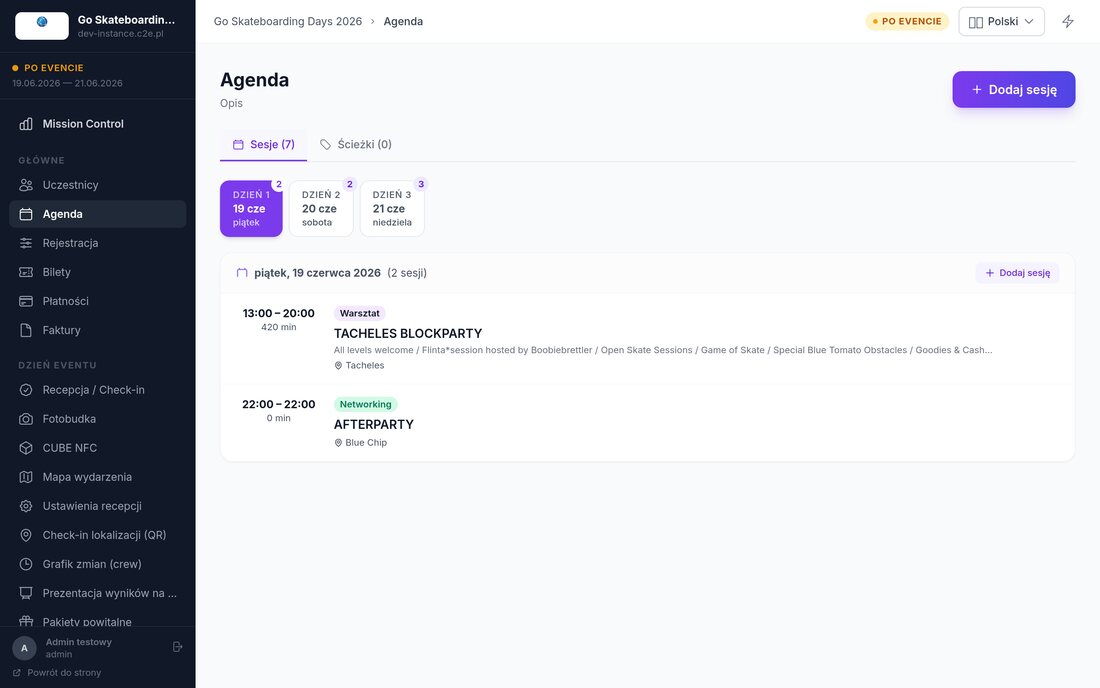
All screens in this document come from a single system — the one we use to run real events. Event names and attendee data have been replaced with sample data. Most screenshots show the Polish interface — the system itself runs in eight languages, including English and German.
Event app on a phone screen

What changes

Three things you notice from day one

For guests

One link instead of ten emails

Programme, ticket, map, practical information and last-minute changes — all in one place, always up to date.

For organisers

One place instead of five tools

Guest list, mailing, check-in, accommodation, payments and reports in one dashboard. No more copying data between spreadsheets.

For your brand

The event looks like yours

Your own domain, logo and colours everywhere: on the website, in emails, in the app and on the badge.

How it connects

Enter data once. It works everywhere.

This is not a set of separate tools stitched together with Excel exports. Everything runs on one guest database and one event programme — so a change in one place is instantly visible everywhere else.

Where data comes from
  • Registration form
  • Guest list imported from a spreadsheet
  • Orders from external ticket sales
  • Ticket sales
  • Exhibitor and partner applications
  • Entries added manually by your team
▶▶▶

One guest database
and one programme

Every guest has their own record, role and personal code. The programme has one source.

▶▶▶
Where you use it
  • Attendee app
  • Check-in and entry control
  • Catering, accommodation, transport
  • Email, SMS, notifications
  • Payments, invoices, reports
Examples of connections
  • Dietary needs from the form → summary for the kitchen → meal handed out against the same guest code
  • Session time changed → event website, app and in-room screen updated at the same moment
  • Check-in at the entrance → live counter → attendance report → certificate only for those present
Examples of connections
  • Ticket paid → status next to the name → invoice sent automatically
  • Workshop sign-up → limit enforced → the waiting list fills a freed place on its own
  • Exhibitor application → its representatives become guests with a code → meeting bookings

The guest journey

From invitation to thank-you

STAGE 1 · BEFORE

Invitation and registration

  • Invitation by email or SMS
  • Form in your event colours
  • Confirmation with a personal QR code
  • Ticket in the phone wallet
  • Reminder the day before
STAGE 2 · ON SITE

Entry and the event itself

  • Entry with a code scan
  • Badge printed on the spot
  • Programme and map on the phone — iPhone and Android
  • Notification of changes
  • Meals and zones on the same code
STAGE 3 · AFTER

Wrap-up and summary

  • Thank-you and survey
  • Certificate of attendance as a PDF
  • Attendance and engagement report
  • Database ready for the next edition

Registration

A form that asks for what you actually need

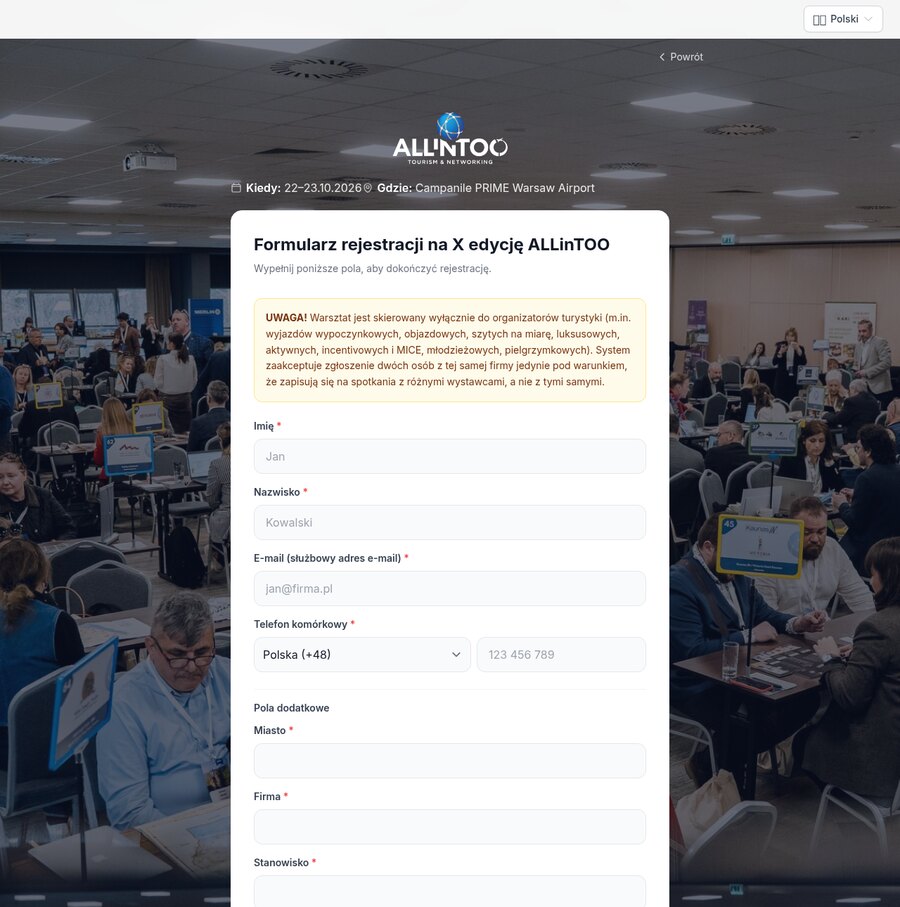
You decide which fields to use — one set for guests, another for exhibitors, another for media. Every registration goes straight into the guest database and triggers the rest of the system. Below are two forms from the same event.

Attendee registration form
Guest registration — basic details, extra fields designed for this event, consents
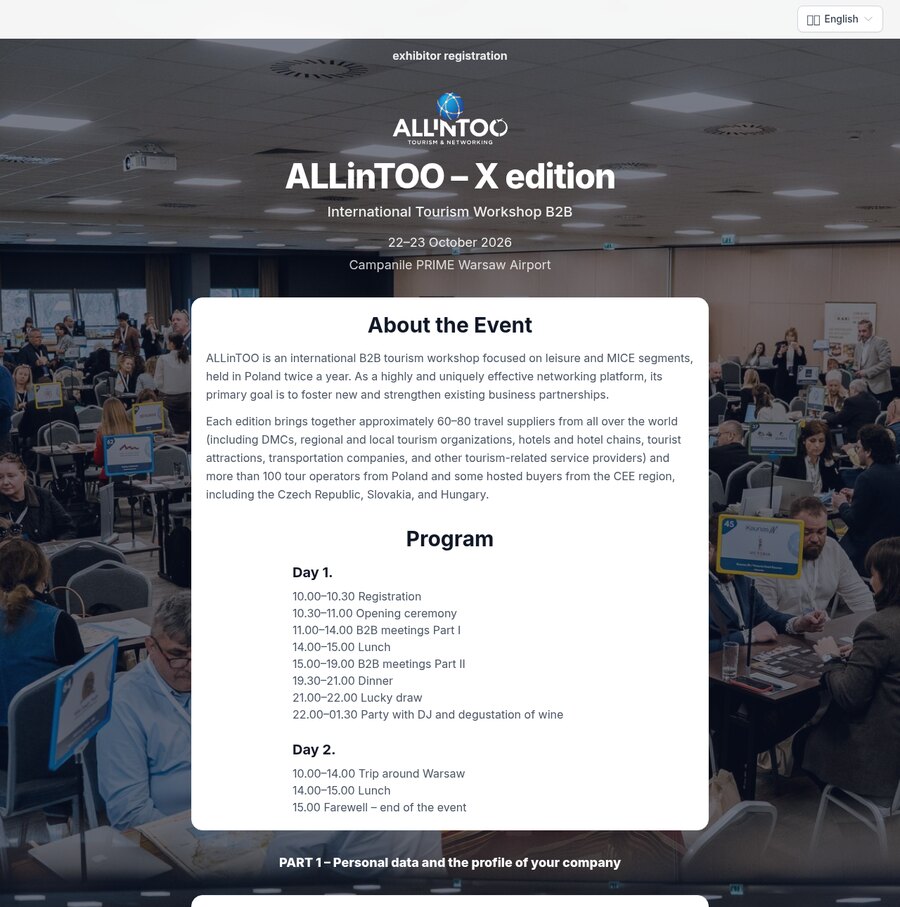
Exhibitor registration form
Exhibitor registration — company details and its representatives, with the event description and programme above the form
What you configure
  • Custom fields — travel, accommodation, diet, T-shirt size, licence plate
  • Consents and terms compliant with the GDPR, stored together with the registration
  • Language versions of the same form
What happens automatically
  • Confirmation with a QR code sent right after sign-up
  • Limits and registration window — a waiting list once places run out
  • Guest visible in the dashboard and on the check-in list in the same second

Multiple dates and cities

One registration, nine cities

A training series, a roadshow, a conference repeated in several cities — it is one event in the system, not nine separate ones. Guests pick a date when they register, and you work on one database and account for each date separately.

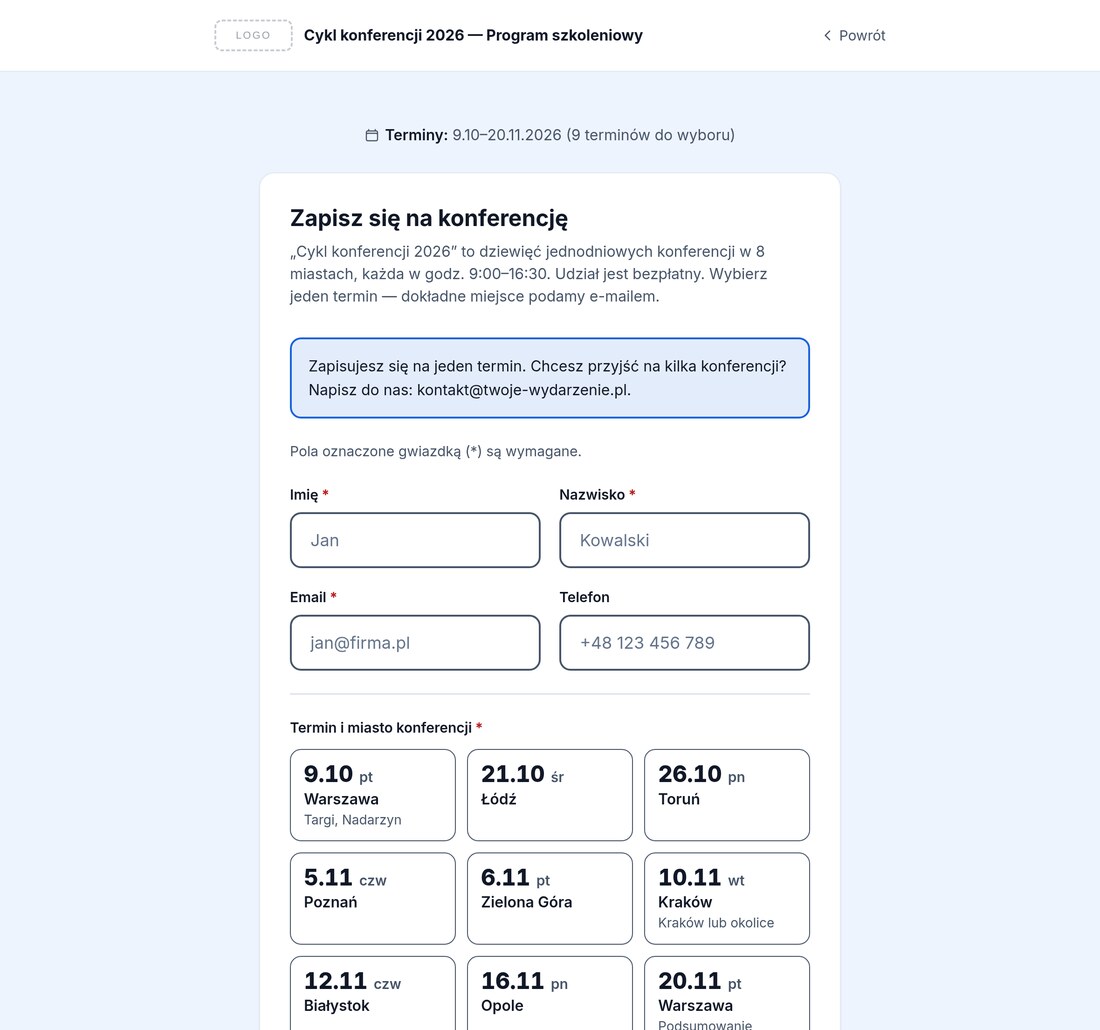
Form with a choice of date and city
Choosing a date in the form — date, day of the week and city on a tile; a date that is full or past its registration deadline is inactive and shows why
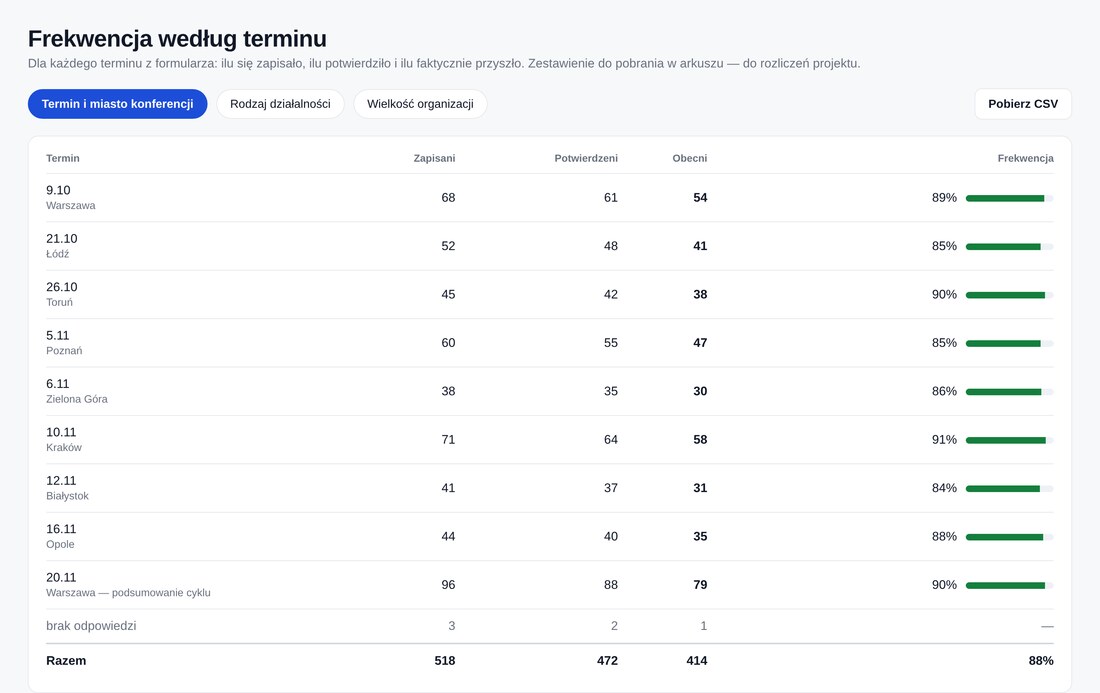
Attendance broken down by date
Attendance by date — registered, confirmed and present for each city separately, with a spreadsheet export for project reporting
Sign-ups

A separate seat limit for each date

Each city has its own pool of places. Once it runs out, that date can no longer be selected while the others stay open. Registration for a given date closes on its own — as many hours beforehand as you set.

On site

Each desk knows its date

The check-in desk in Kraków sees the Kraków list — even without internet. Today’s date is selected automatically, and a walk-in added on site goes straight to the right date. A guest registered for another date is flagged, so nobody walks into the wrong session by mistake.

Communication and reports

A message for one city only

Reminder emails and SMS go to attendees of the selected date, not the whole database. Lists, exports and the attendance report filter the same way, and the dashboard shows each date on its own row: registered, limit, seats left and present — you account for each date separately.

The attendee app

One app for iPhone and Android

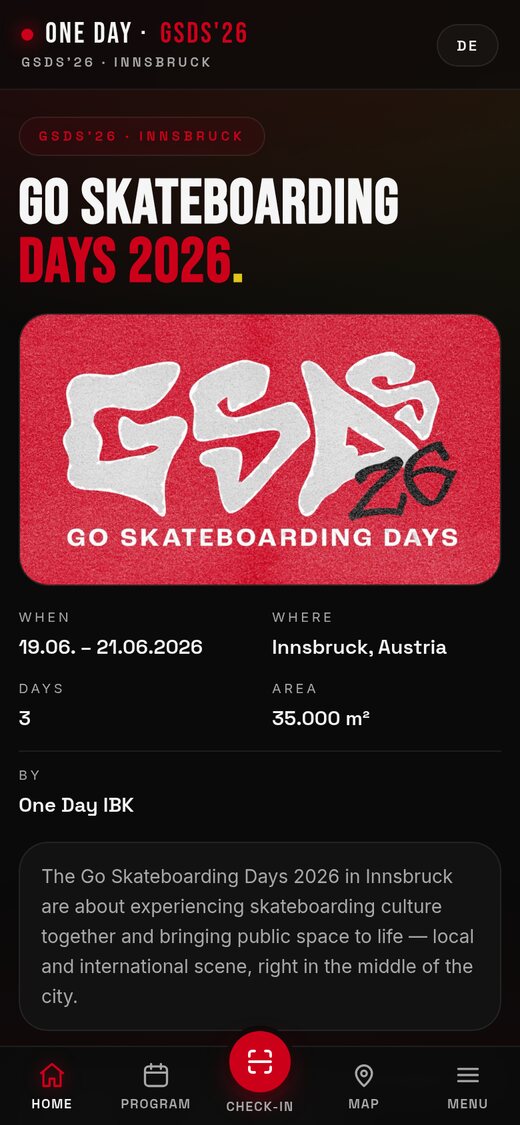
One app for every phone: it opens from a link, behaves like a regular app and can be pinned to the home screen. The same address works on iPhone and Android, so guests never have to search an app store — and on request we also prepare a version to download from the App Store and Google Play. Below, an outdoor event we delivered.

Event app home screen
Home screen
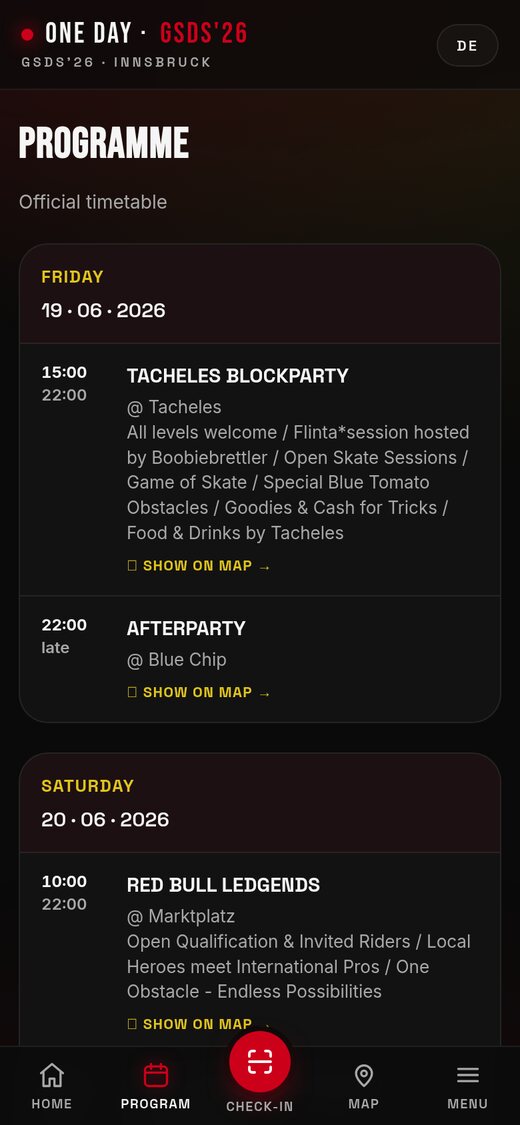
Event programme in the app
Programme
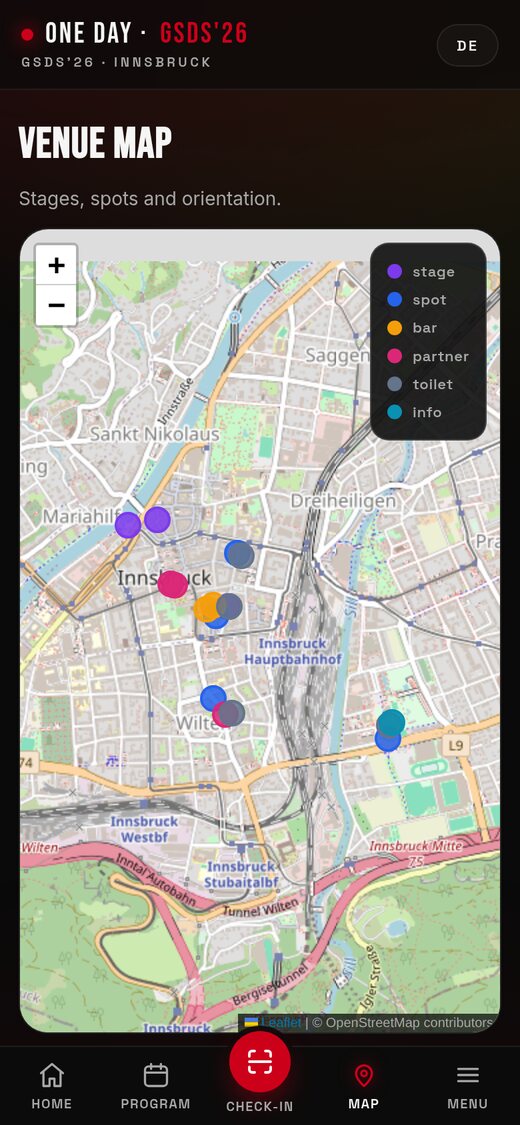
Event site map
Site map
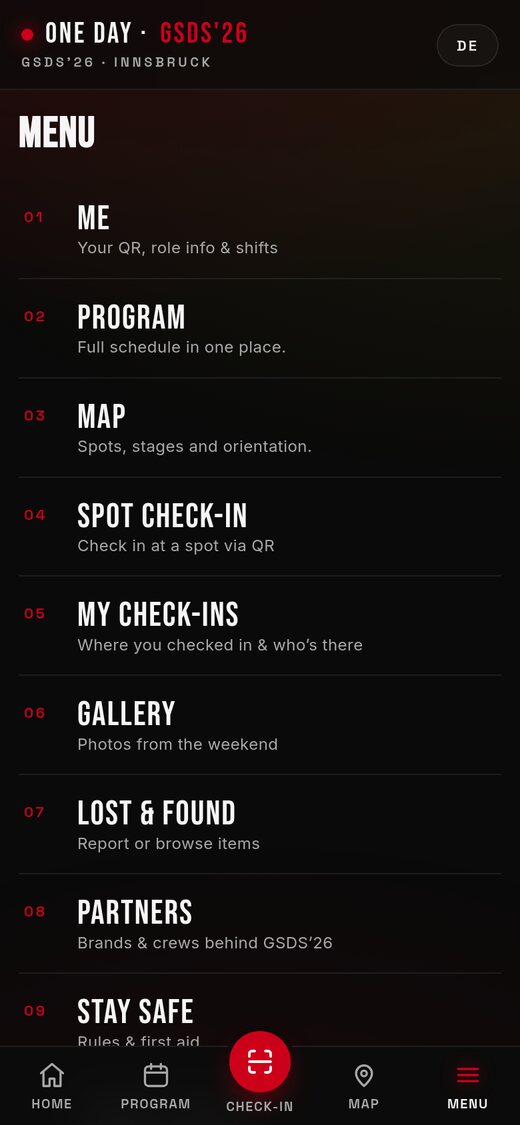
App feature menu
Feature menu
  • Ticket and profile — QR code, attendee details, assigned role
  • Programme — day by day, with the location and a description of each item
  • Map — stages, stands, food, first aid, toilets
  • Notifications — schedule changes, organiser announcements, alerts
  • Sign-ups — workshops and sessions with seat limits and a waiting list
  • Venue — building and room with a photo, how to get there, map and contact
  • Interaction — votes, quizzes, questions for the speaker
  • Networking — attendee profiles, meetings at tables
  • Extras — gallery, lost and found, survey, certificate
  • App store version — on request, App Store and Google Play
  • Look and feel — designed around the event brand, not a template
  • Home screen — a highlighted button for the key action, plus the event partners

Screenshots from the live app of an outdoor event (Innsbruck, June 2026).
The set of tabs is chosen per event — a congress sees different ones, a corporate gala different again.

Management dashboard

Your team works in one window

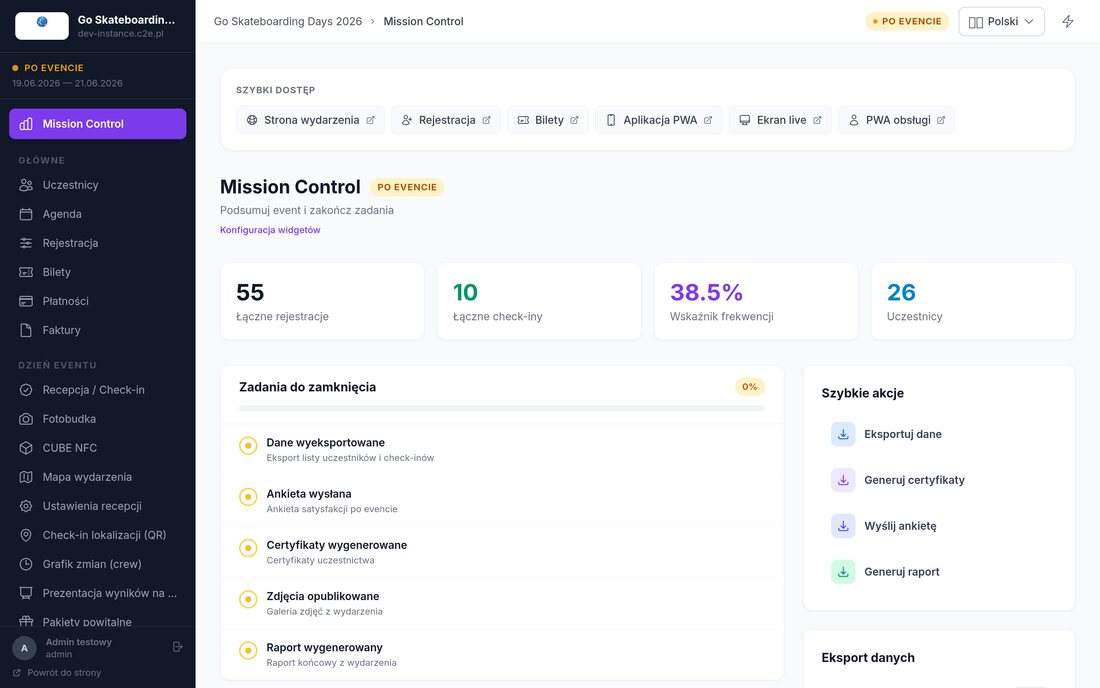
The dashboard guides you through the event in phases: preparation, event day, wrap-up. The main view shows the current status and the tasks still to be closed.

Main view of the event management dashboard
Main view — live figures, a list of tasks to close and shortcuts to every event tool
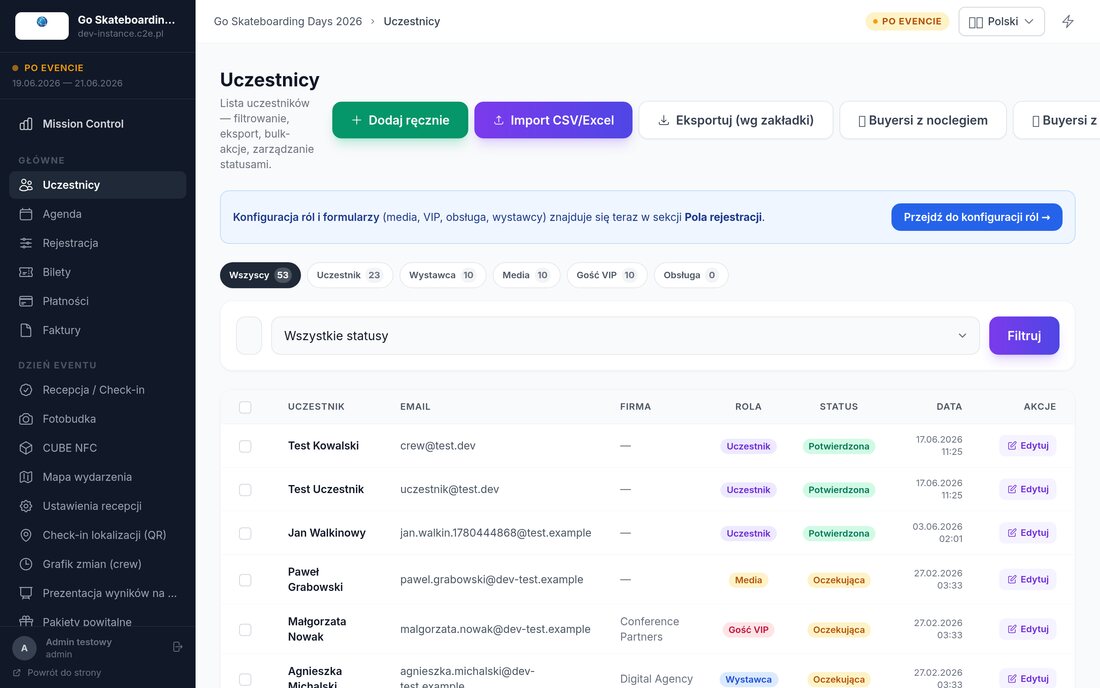
Attendee list with roles and statuses
Guest list — split by role, registration status, filters, spreadsheet import and export
Event programme in the organiser's dashboard
Programme — days, times and item types; every change goes straight to guests' phones
Simplified event view for the client
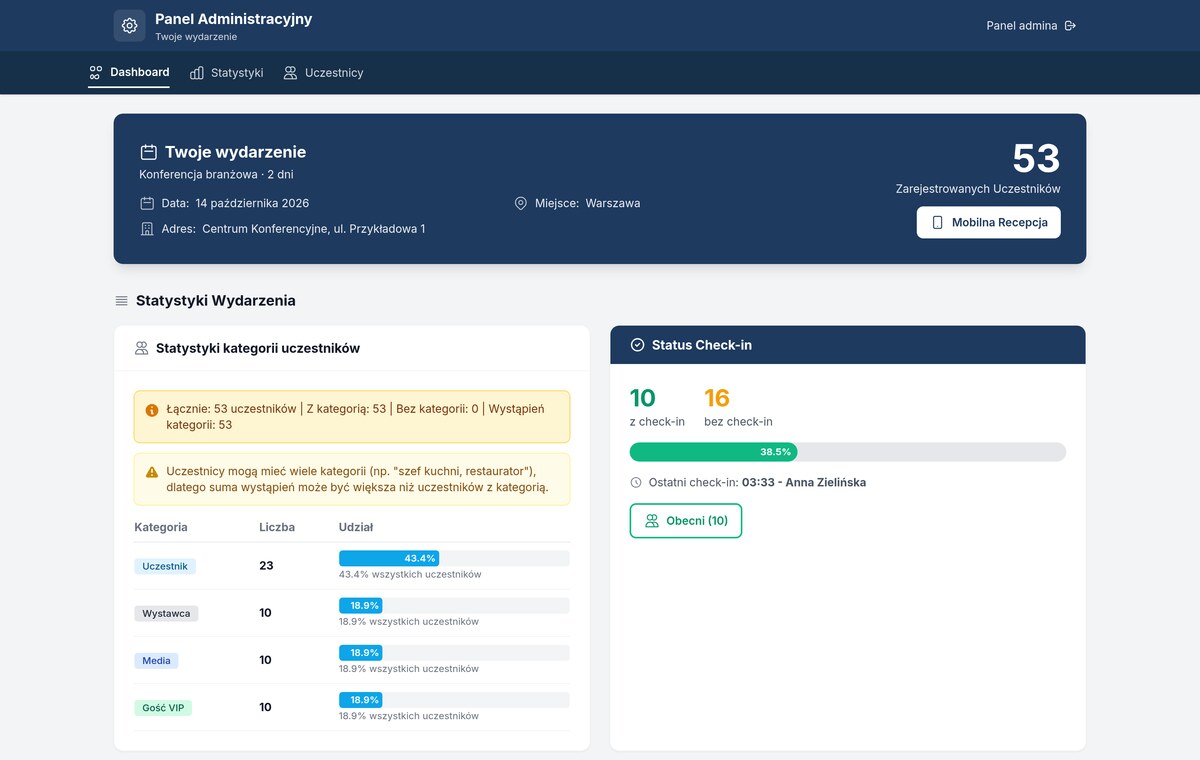
Client view — the key figures on a separate link, without logging into the dashboard and without guests' personal data

Your client gets their own link. Instead of sending screenshots or giving someone dashboard access, you share a simplified view: how many people have registered, how the guest groups break down, how many are already on site. The board or a sponsor checks it themselves while you carry on working.

Permissions

Everyone sees their own part

The organiser has full access, check-in staff only check-in, crew only their own area. The change history is recorded.

Teamwork

Several people at once

Many users work on the same data at the same time — no more sending each other new versions of a file.

Output data

Exports without asking

Guest list, check-ins, orders and survey results can be downloaded at any time, in spreadsheet format.

Event-day tools

The small things usually done by hand

Things people only think about once on site — which are in the system from the start, so nobody has to track them on paper or in a messenger group.

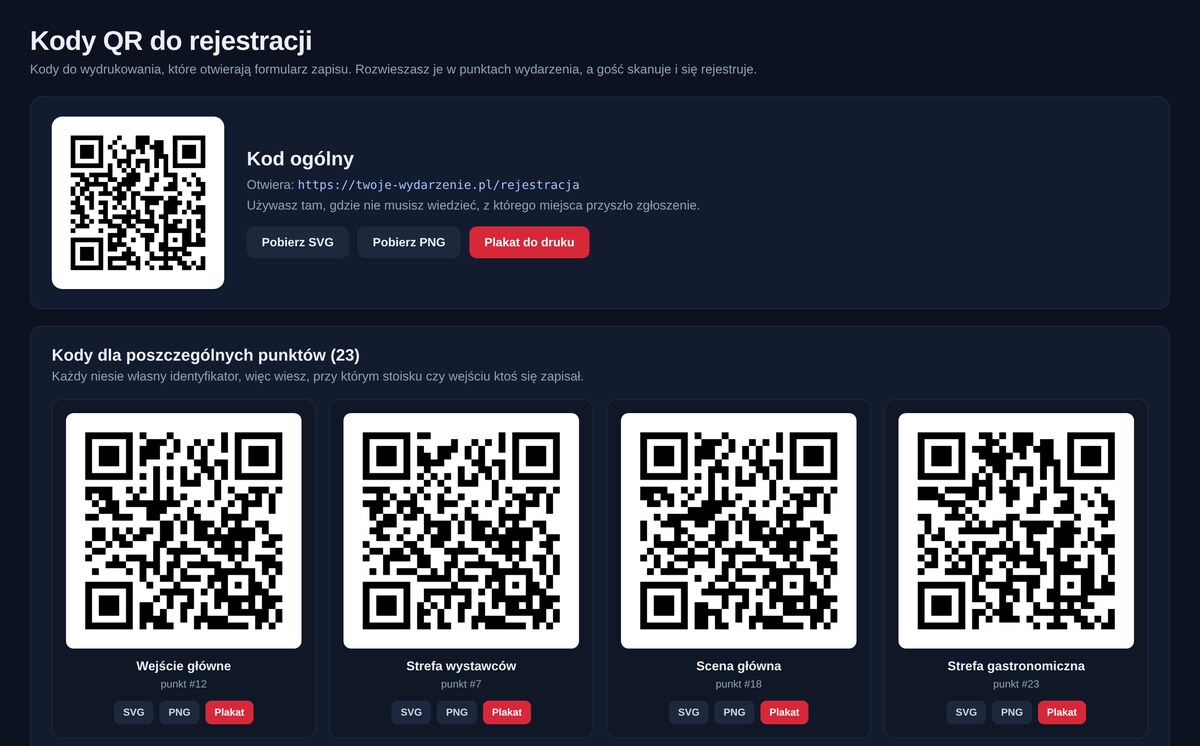
Panel with registration QR codes
Code panel — one general code and a separate one for every point at the event
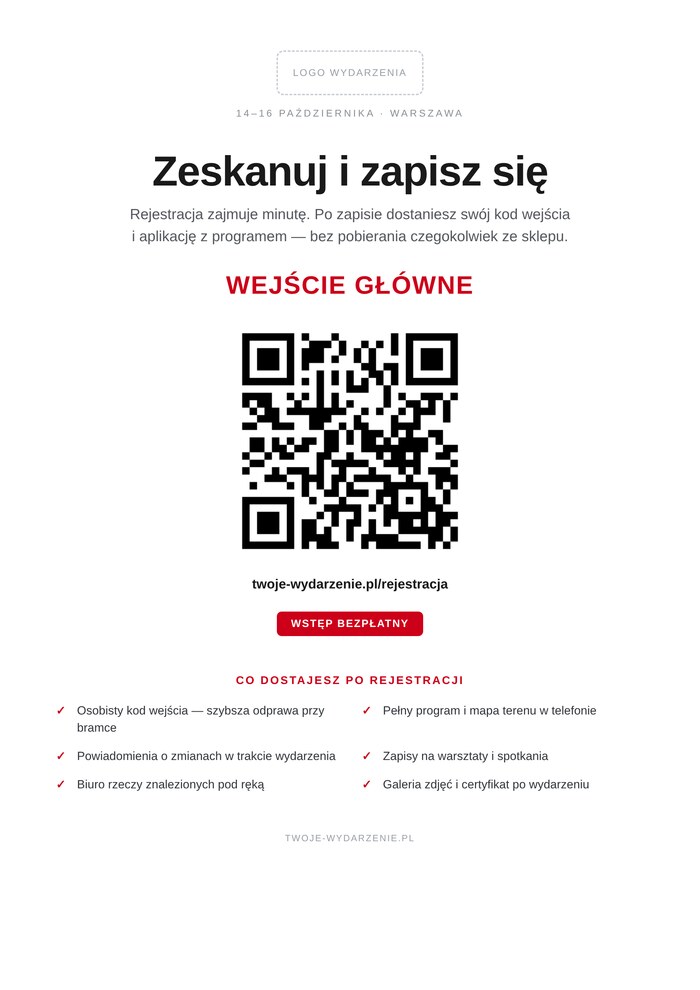
Print-ready poster with a QR code
A4 poster — print-ready, with the name of the point and reasons to sign up
Crew schedule

Who, what and when

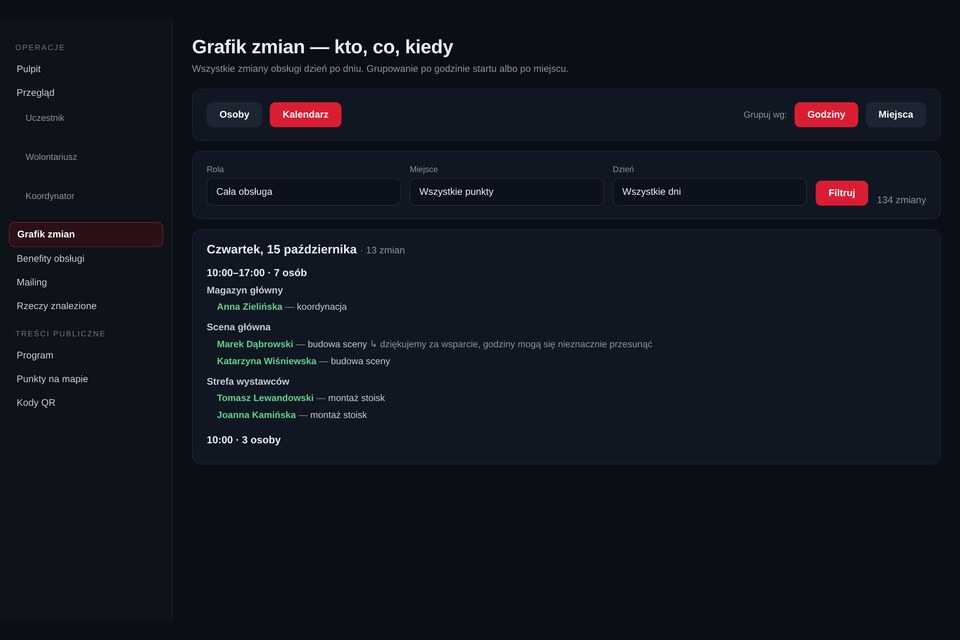
All shifts in one calendar, filterable by role, place and day. You attach the briefing to a shift, and everyone sees only their own hours and tasks on their phone.

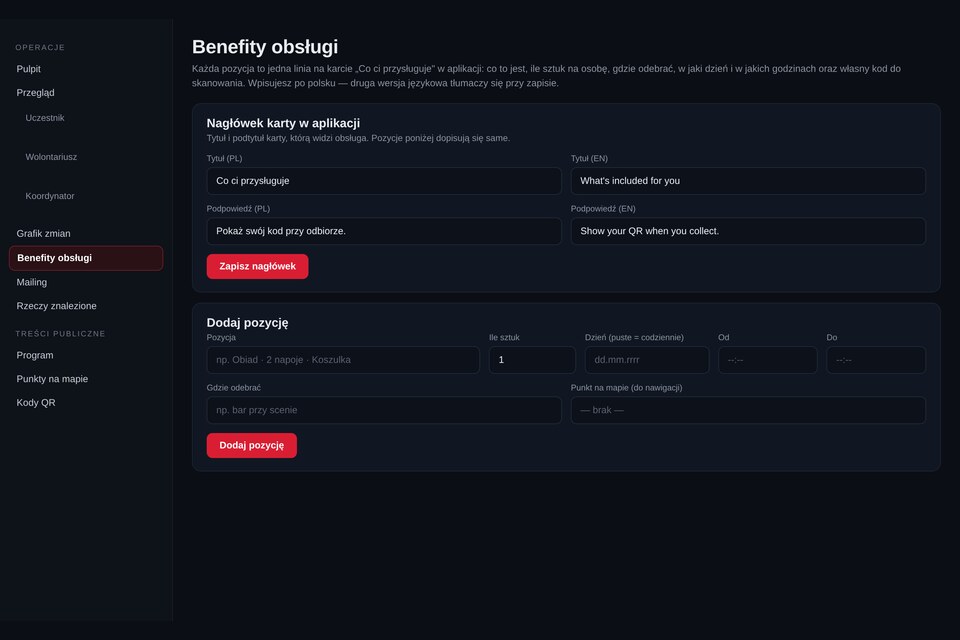
Crew perks

Who is entitled to what

Meal, drink, T-shirt — each item with a quantity per person, day, serving hours and its own scan code. Language versions translate themselves.

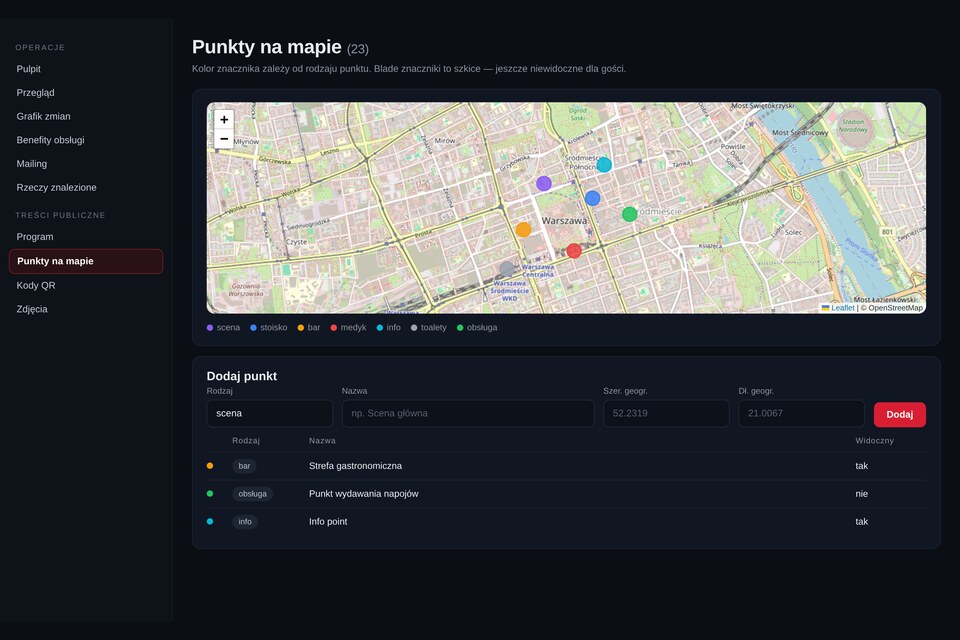
Map points

The venue, described once

Stages, stands, bars, first aid, info, toilets — colour-coded by type. A point can stay a draft until you want guests to see it.

QR codes

Sign-ups from a poster

A general code and a separate code for each point, so you know where a poster worked. Download as a graphic or as a print-ready poster.

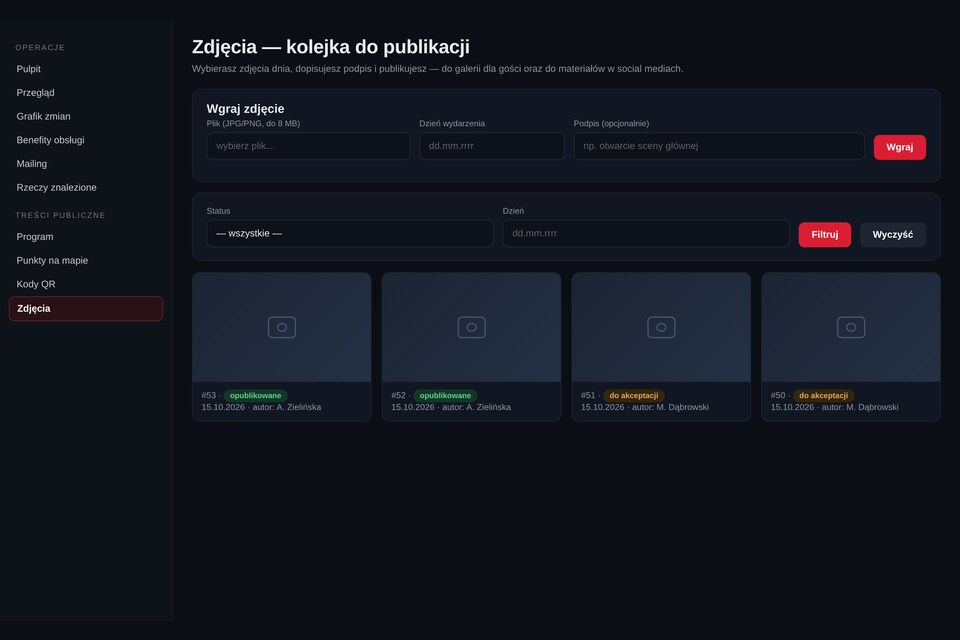
Photos

Publishing queue

The photographer uploads the day's photos, someone adds a caption and approves them, and approved shots go to the guest gallery and into social media material.

Info point

Questions and lost property

A log of found items with photos and emergency contacts at hand — instead of a note taped to the desk and a phone nobody answers.

Crew shift schedule
Shift schedule — day by day, with a meeting point and a task for each person
Crew perks configuration
Crew perks — how many per person, on which day and during which hours
Points on the event map
Map points — type, map preview and the decision: draft or visible to guests
Photo publishing queue
Photos — upload from the event day, caption, approval and publication

Entry and check-in

The queue at the door is the first impression

Check-in takes a few seconds and works even when the venue's internet lets you down.

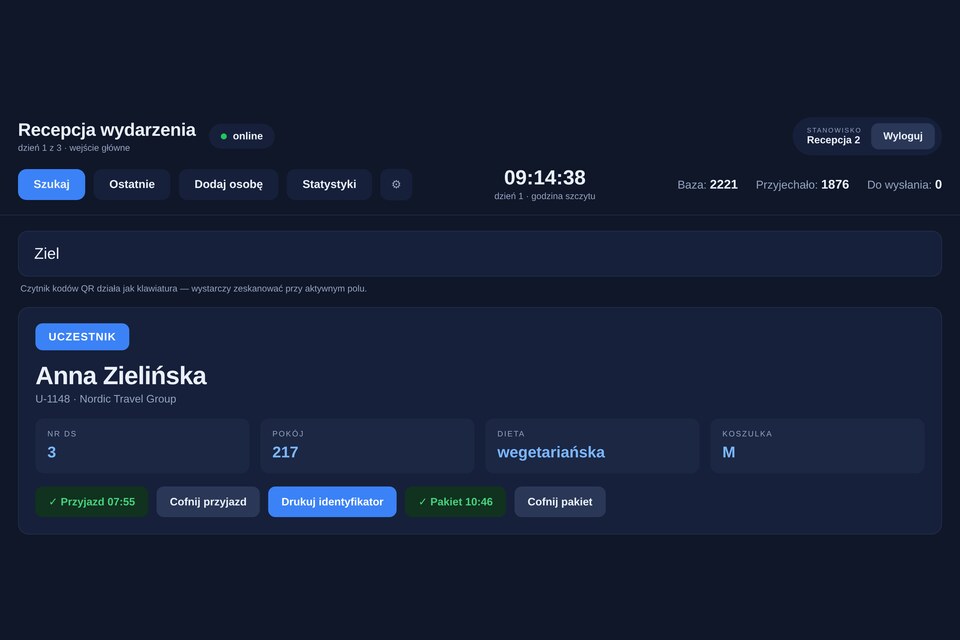
  • Code scan from a phone or a printout — with a scanner or the camera of a tablet or phone; or a search by name, company or email
  • Everything about the guest on one screen — role, room, diet, T-shirt size
  • Badge printed on site and the welcome pack recorded
  • NFC cards and wristbands for multi-day events
  • Several desks in parallel — each sees the same status
  • Resilient to weak networks — scans sync automatically
Guest handling screen at check-in
Guest handling — stay details on one screen, check-in and badge printing
Arrival statistics at check-in
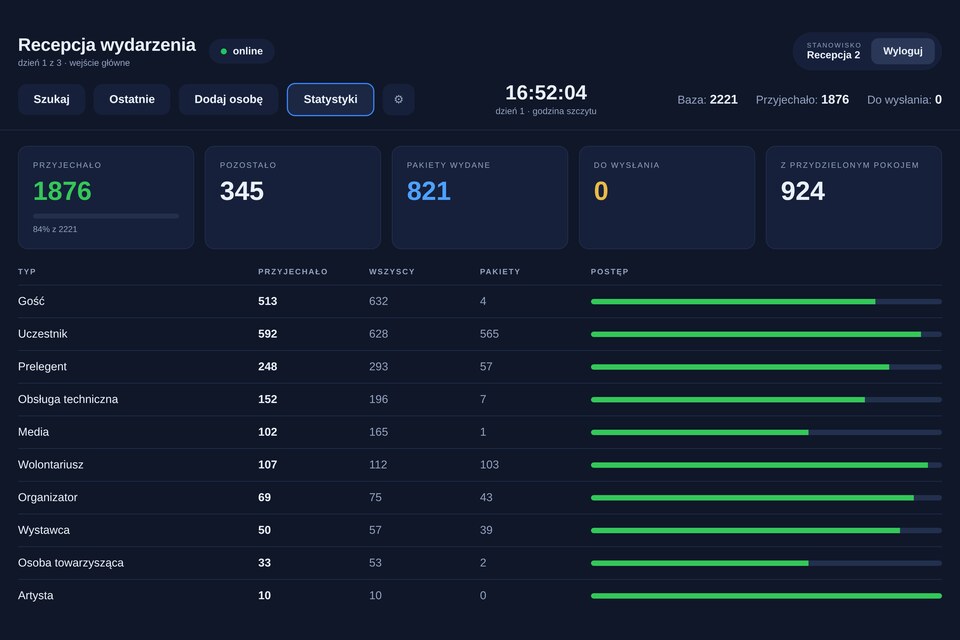
Entry statistics — attendance and packs handed out, by guest group
Assigning an NFC wristband to an attendee
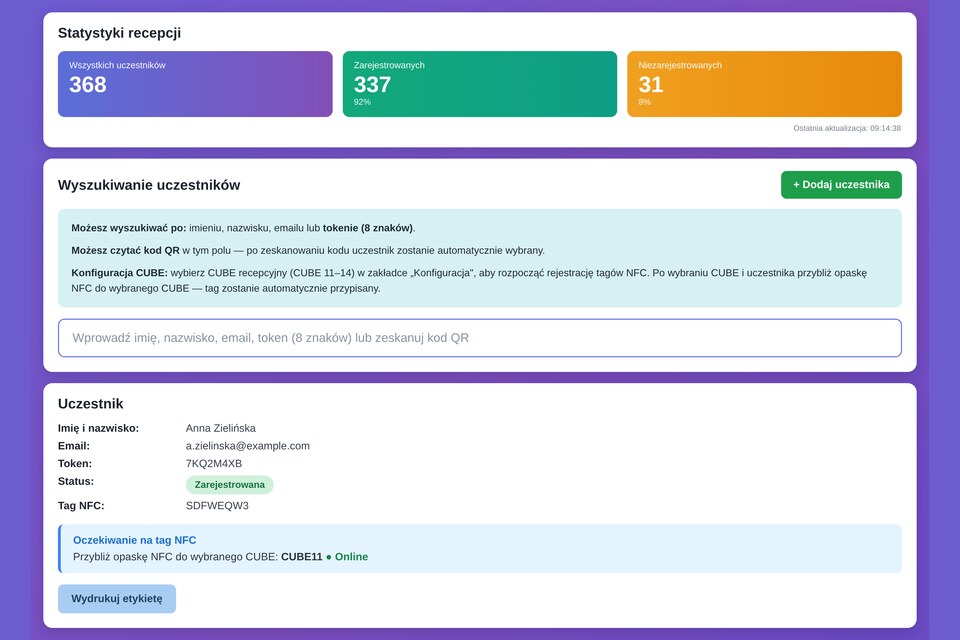
NFC wristbands — assigning a wristband to a guest and printing a label

Three views of the same desk: handling a single guest, live attendance and assigning NFC wristbands. Example: an event for 2,200 people.

Guest logistics

Accommodation, travel, meals and packs — without a spreadsheet

Everything that usually drifts apart between departments lives on the guest record and is visible to the whole team.

Accommodation

Hotels and rooms

Properties, room types and allocations. Bookings assigned to guests, room allocation and roommate matching. The list for the hotel is ready to send.

Transport

Transfers, buses, parking

Routes and times, sign-ups for a specific run, passenger lists for drivers. A separate pool of parking spaces.

Catering

Menus, diets and serving

Preferences and allergies collected at registration — the kitchen gets a ready summary. Meals served against the same code, with a daily limit and serving hours.

Packs and zones

Materials and access control

A record of welcome packs: who collected the bag and materials. Zones with a capacity limit, after-party entry, age checks.

Programme and engagement

A room that responds

Attendees stop being spectators. Speakers get real-time feedback, and you get data on what actually engaged people.

  • Agenda and speakers — one source for the website, the app and the screens
  • Workshop sign-ups with seat limits and a waiting list
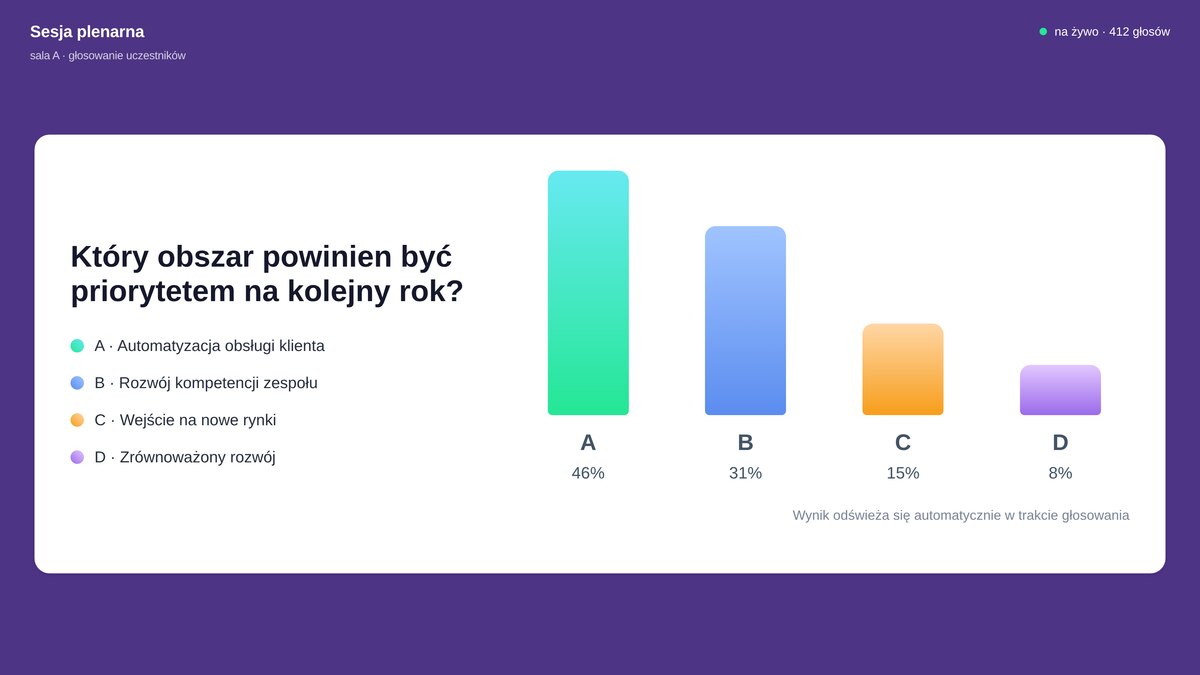
  • Live voting — results on screen within seconds
  • Quizzes with a leaderboard — a touch of competition and prizes
  • Questions on screen — moderated, no microphone passed around the room
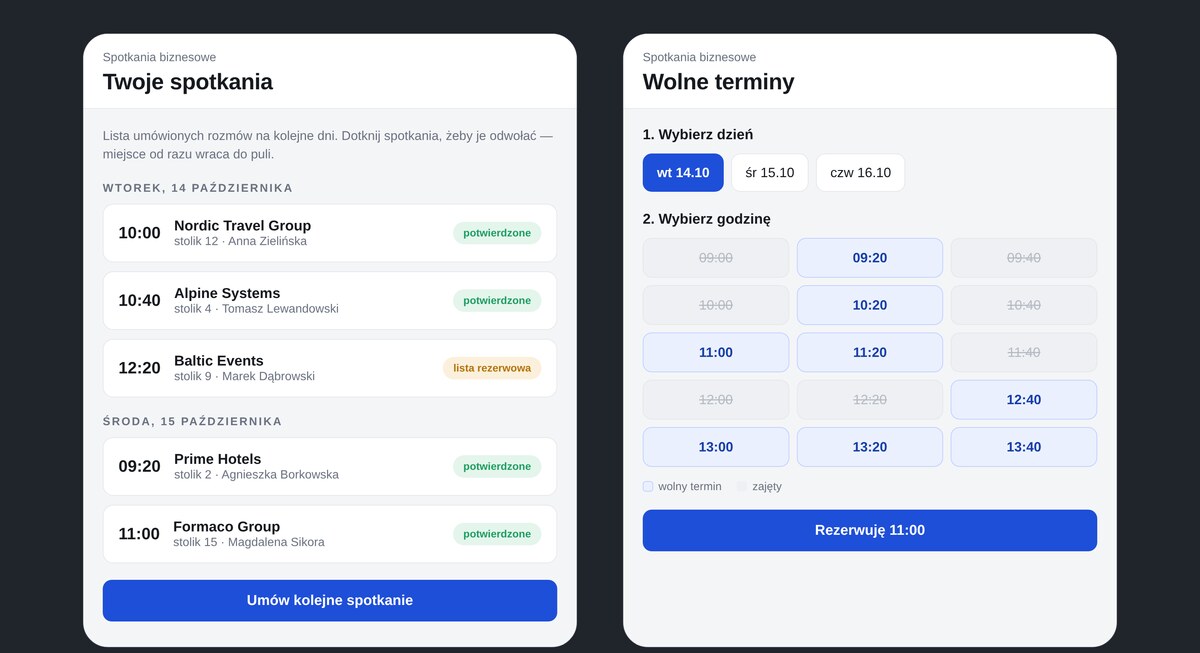
  • Business meetings — booking a table slot from the phone
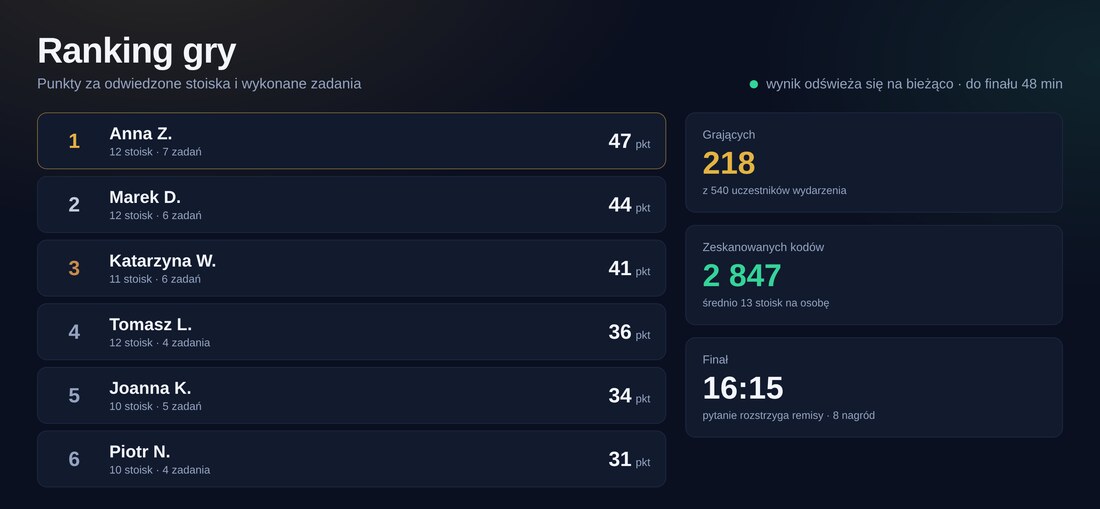
  • Stand game — attendees collect points by scanning codes at exhibitors; live leaderboard, printable QR cards
  • Prize draws and contests — transparent, with a list of participants
Booked business meeting screens in the attendee app
Business meetings — booked conversations with the time and table number, plus booking a free slot. A cancelled place returns to the pool and goes to the next person on the list
Attendee vote result displayed on the screen in the room
Live voting — a question from the stage, answers from phones, the result on the screen growing as votes come in
Photo booth

Photos taken by the crew, printed at the same time

A host photographs guests during the event — on stage, at a stand, on the dance floor. The shot gets the event frame immediately and goes into a print queue running in parallel elsewhere in the venue.

Collection

Ready to collect at the info point

Guests give their code and collect the print: a photo magnet, a framed print, a sticker. The code keeps photos from getting mixed up, and everyone downloads the digital version from the gallery themselves.

Games and competition

Competition that leads guests around the venue

Exhibitors pay for footfall at their stand, speakers fight for the room's attention. Games and quizzes deliver both — and leave hard data on who went where and what interested them.

Game leaderboard displayed on the screen in the room
Leaderboard on screen — points grow during the event; alongside, the number of players, codes scanned and the time of the final
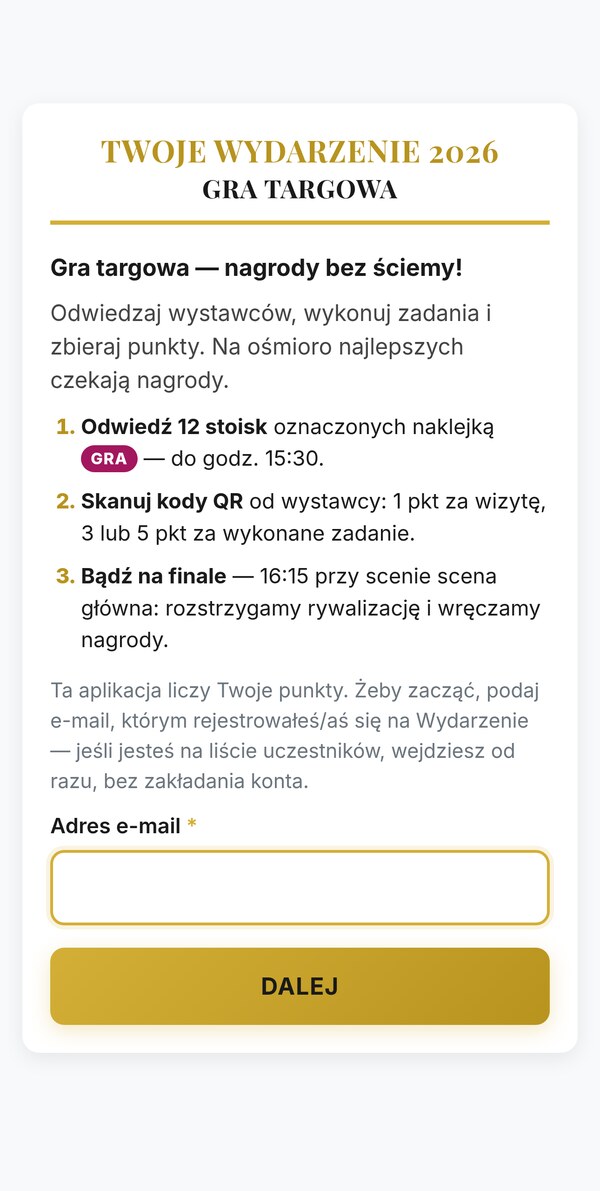
Game rules on an attendee's phone screen
The game on the phone — rules, points counter and code scanner
Stand game

Points for visits and tasks

Every stand gets its own printable QR code: a point for the visit itself, more for completing a task at the exhibitor. Guests scan with their phone, the counter rises, and the leaderboard is visible on the screen in the hall. Players join by SMS — one number is one account, so nobody collects points twice.

Quizzes

Knowledge instead of silence after a question

Questions go to the phones, answers are counted automatically, and the result appears on screen instantly. A speaker runs the quiz between sessions, or the host of the evening does — with a leaderboard and a prize for the best. A final question settles any tie.

Prize draws

Prizes beyond suspicion

A draw from the list of those present, in front of the room, with a record of who won what. You can limit it to people who visited a partner's stands or completed the survey — closing the loop on what the sponsor cares about.

The final takes place on stage. Guests who visited every stand get an SMS invitation and confirm they are present with a code shown on screen. A short quiz on their phones decides the order — correct answers and speed both count — and the finalists’ ranking goes live to the LED screen. You decide how many places the final has.

After the event, a report remains. How many guests played, how many codes were scanned, which stands were visited most, who won and for what. Material for talking to exhibitors about the next edition — harder evidence than “there were lots of people”.

Communication

Messages reach the right people

Email

Campaigns and confirmations

Invitations, confirmations, reminders and thank-yous in the event template.

SMS

Short and reliable

Where email will not arrive in time: a venue change, a delay, an entry code.

Push

Straight to the screen

A notification on the attendee's phone, at no cost per message.

Announcements

Pinned in place

A message visible in the app until you switch it off.

Every message can be sent to a chosen group — speakers only, crew only, VIP guests only. The system takes recipients straight from the guest database, so there is no need to build lists by hand. In an emergency the same message goes out by email, SMS and notification at once.

Tickets and billing

Sales and documents in one flow

For paid events — from the basket to the documents, without retyping data between systems. You are the seller — payments go to your account and your details are on the document. Invoices can be issued by the system or by your accountants; you choose whichever suits you.

  • Ticket types — early bird, bundles, day passes
  • Discount codes and sales limits
  • Online payments — Przelewy24, PayU, BLIK, traditional bank transfer
  • VAT invoice or non-VAT receipt issued automatically once the payment is booked — with your details, continuous numbering and a PDF in the dashboard (the document type depends on your VAT status)
  • Or just the data, if your accountants issue the documents — company, tax ID (NIP) validated by its check digit, address from the form
  • KSeF — VAT invoices go to Poland's National e-Invoicing System, as required from 2026; non-VAT receipts stay outside it, as the regulations provide
  • Document by email to the buyer, a copy in the dashboard; a summary of all documents to download
  • Summary — who paid, who came, how much each ticket pool brought in

Live figures

You know what is happening — without phoning around

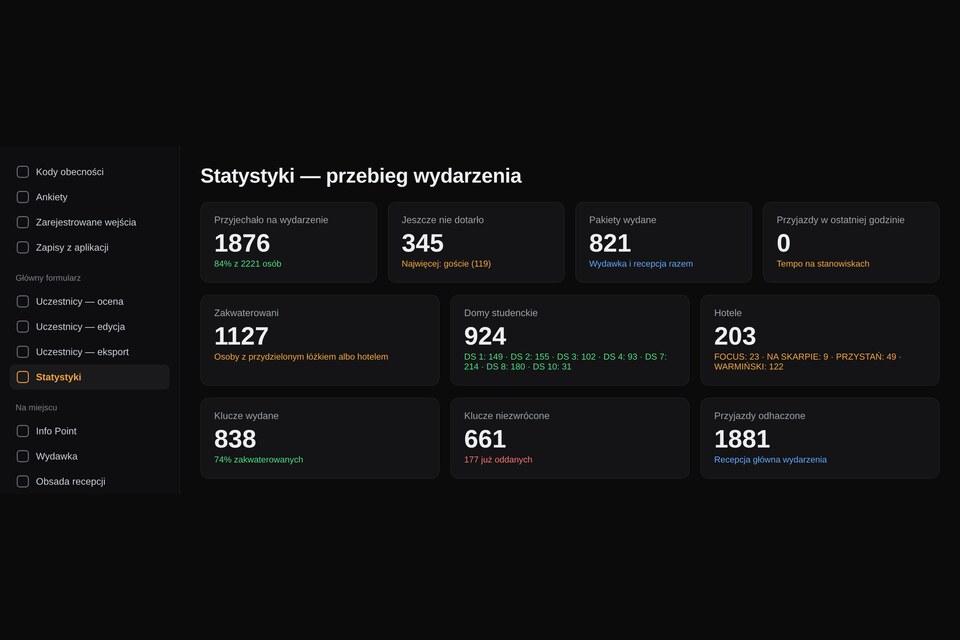
The dashboard counts everything itself: who has arrived and who has not, how many packs were handed out, how many keys are out in the rooms. After the event the same data forms the final report.

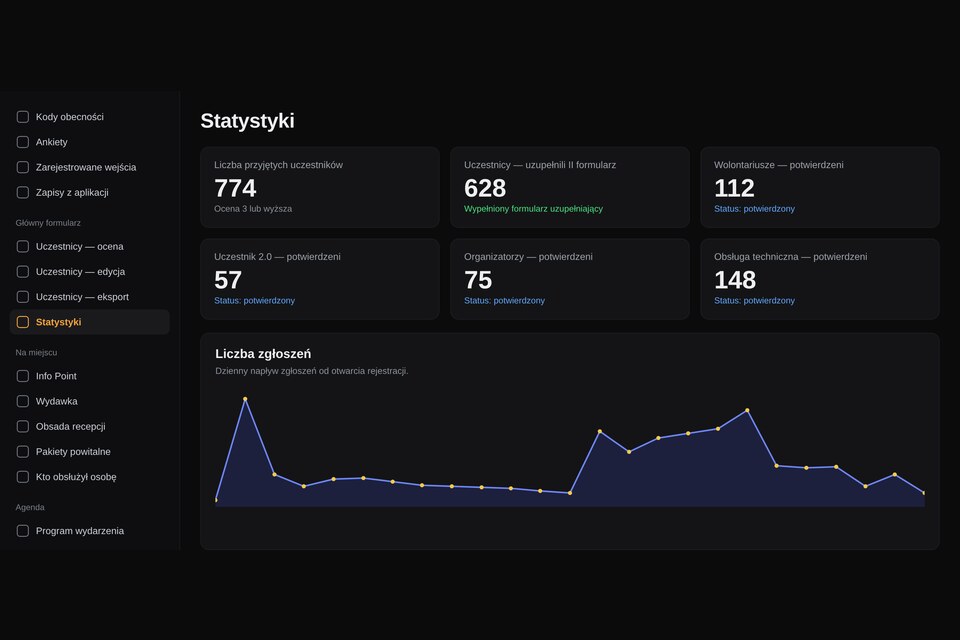
Registration and confirmed group statistics
Registrations — inflow day by day and the status of each guest group
Event progress statistics
Event progress — arrivals, packs, accommodation and keys in one place
Key summary by building
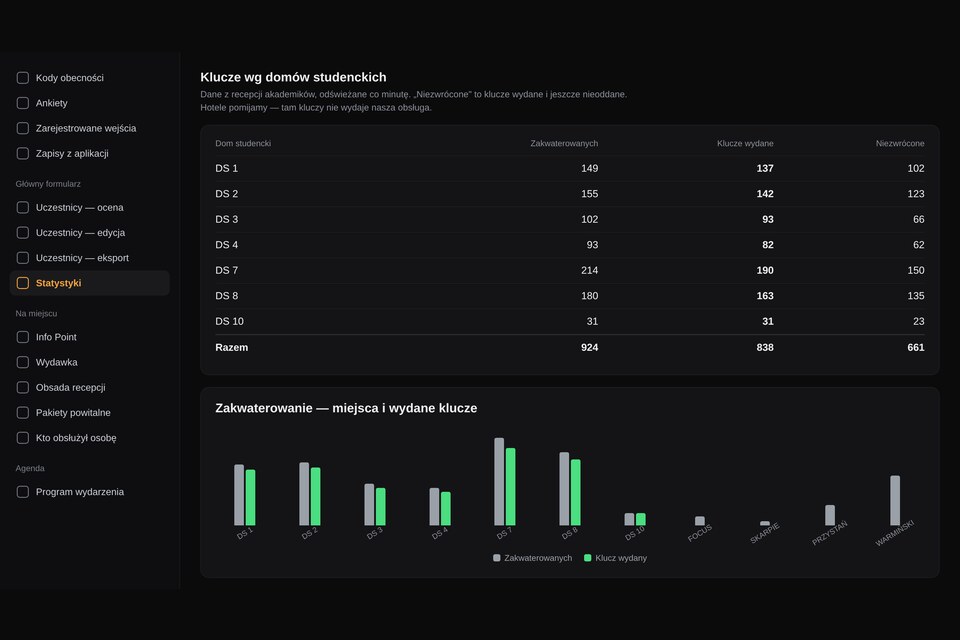
Accommodation — status of places and keys in each building separately
During the event
  • Attendance — how many have arrived and what share of those registered that is
  • Arrival rate — when the peak will hit the check-in desk
  • Accommodation — building occupancy, keys issued and not yet returned
  • Hand-outs — welcome packs, meals, materials
After the event
  • Registrations over time — when your communication worked
  • Where guests came from — geographical breakdown
  • Who served whom — a work log for every desk
  • Export everything to a spreadsheet — without asking for help

After the event

The event ends, the knowledge stays

Feedback

Survey and ratings

Questions sent at the right moment — separately to guests and to speakers. The survey is filled in within the app: sections, grid questions, an “Other” answer and an anonymous mode. Results go to a spreadsheet with the full answers, not codes.

Materials

Certificates and photos

A PDF certificate of attendance with your logo, and a photo gallery for attendees.

Figures

Event report

Attendance, movement between zones, session participation, voting results — material for a summary for the board or a sponsor.

Your brand

Your own address and look

The event runs on the domain you choose, with your logo and colours — on the website, in emails, in the app and on the badge.

Accessibility

WCAG 2.1 AA compliance

The event website, registration form and app work with a keyboard and a screen reader, have labelled fields and compliant contrast. Guests can enlarge the text and switch on high contrast themselves, and the site has an accessibility statement. For public and EU-funded projects this is usually a requirement, not an extra.

Your data

Security and GDPR

A separate database solely for your event, servers in the EU (Poland), backups every day. Consents collected together with the registration; export and deletion of an individual's data on request — with a record of who asked and when.

End of the project

You can delete all attendee data

Once the event is settled, you have three options: keep the database for the next edition, hibernate the event (the data stays, the system is switched off) or permanently delete all attendee data together with the backups. Before deletion you get a full spreadsheet export, so you keep what you really need.

Deletion itself is irreversible — the database, files and backups are gone, so the data cannot be restored. That is exactly what the GDPR right to erasure requires. You receive written confirmation of the operation for your project records.

Retention period

Nothing disappears without your decision

No automatic process deletes data after a set number of days — as the data controller, you decide how long it is needed (one period for the attendee list, another for accounting documents), and we carry out the instruction. So data never vanishes in the middle of project reporting or just before the next edition.

Post-event survey results in the dashboard
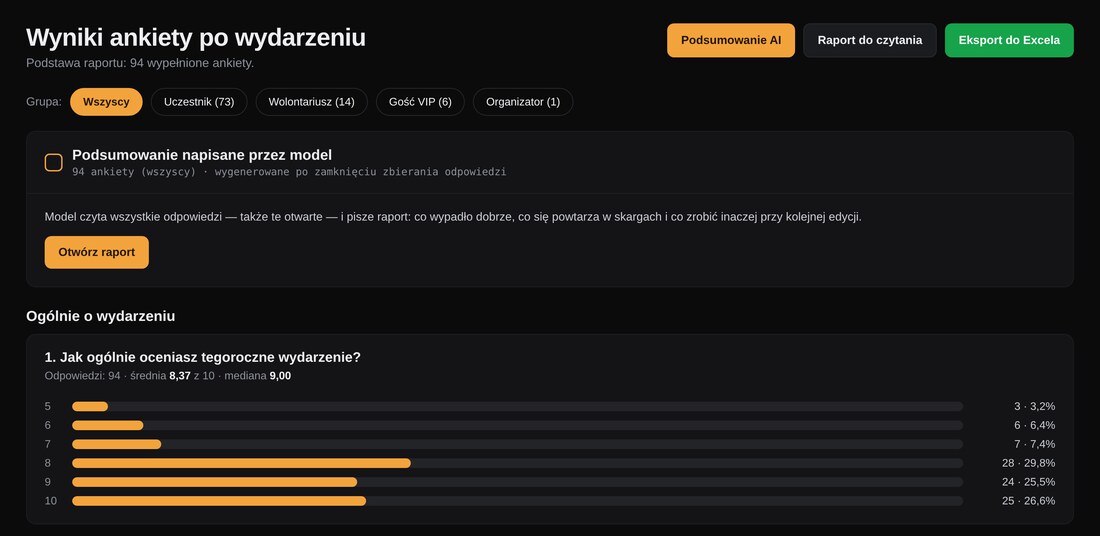
Survey results — rating distribution, breakdown by guest group and spreadsheet export
Survey report written by an AI model
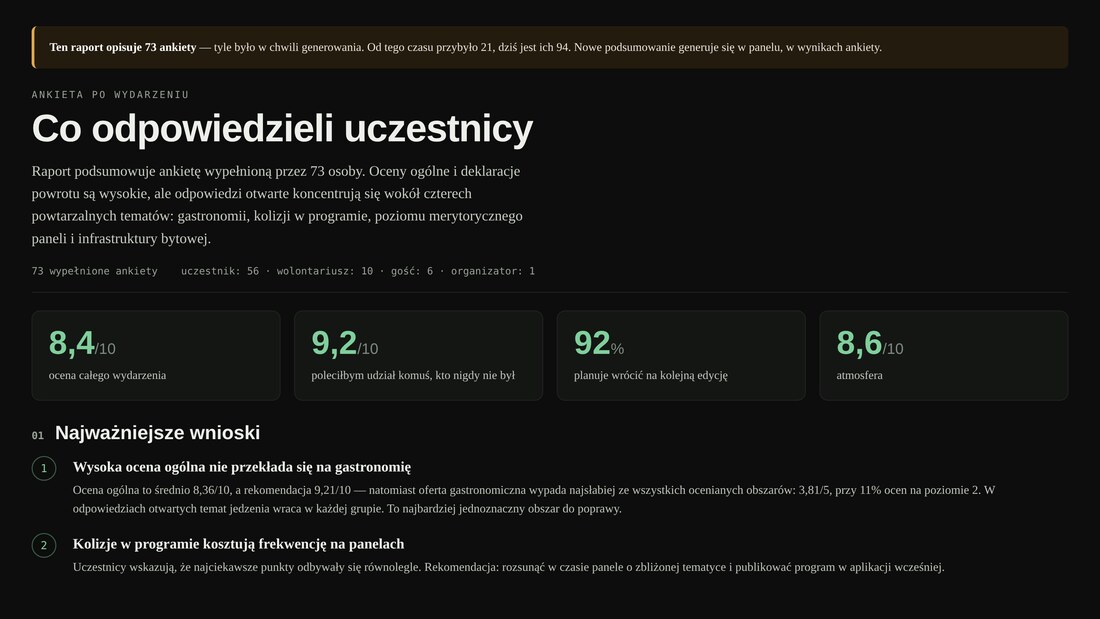
Survey report — written by an AI model: conclusions, weak points and recommendations for the next edition

The survey sends itself once the event is over, and the answers — including open-ended ones — are read by an AI model that turns them into a report: what went well, what keeps coming up in complaints and what to change for the next edition. Instead of hundreds of individual comments you get ready-made material for the wrap-up meeting.

Work report — who worked on the event
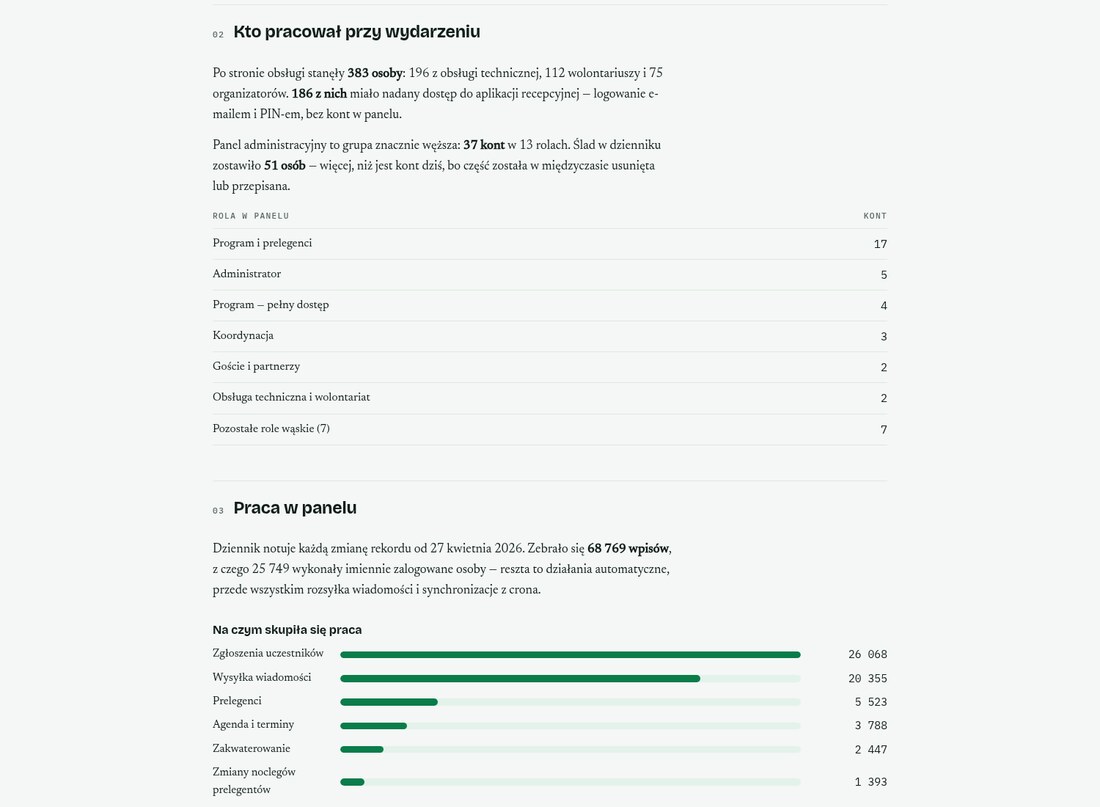
Who worked on the event — crew numbers, dashboard accounts by role and what the team's work focused on
Work report — system performance assessment and recommendations
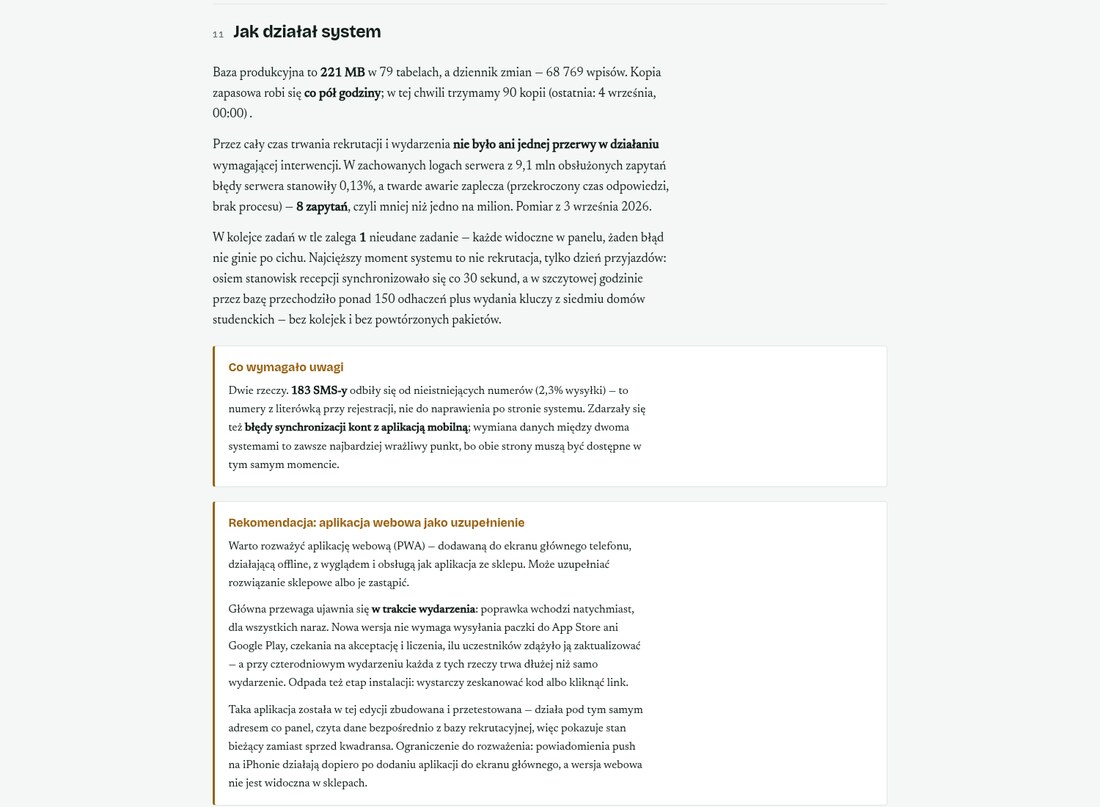
How the system performed — load and availability in figures, what needed attention and recommendations for the next edition

The final report writes itself. The system counts everything it recorded while you worked: registrations, dashboard log entries, check-ins and mailings. The result is a document for the board and for the team — with an assessment of the load, what needed attention and recommendations for the next edition.